| File Name: | Character Design in Houdini |
| Content Source: | https://www.rohandalvi.net/character |
| Genre / Category: | 3D Tutorials |
| File Size : | 7.6 GB |
| Publisher: | rohandalvi |
| Updated and Published: | November 29, 2025 |
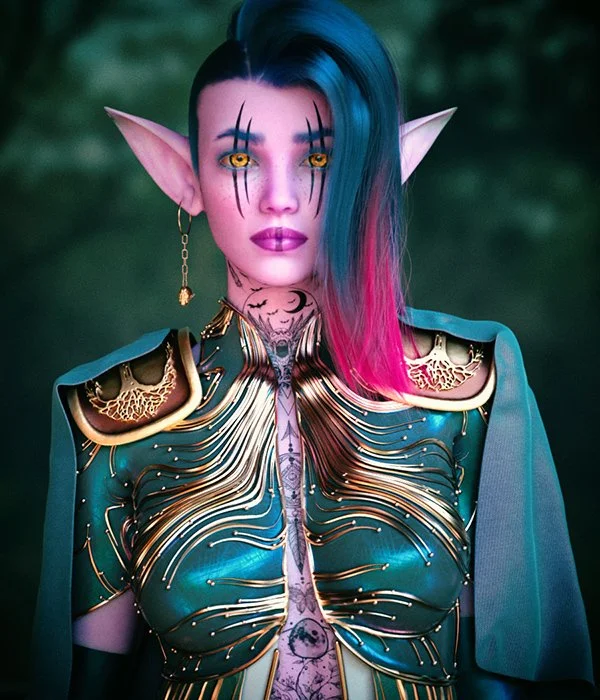
The purpose of this training is to take a base human model from Daz and then build a detailed character in Houdini. We will add clothing using vellum , model jewelry and build a full hairstyle and eyebrows in Houdini. In the end we will make shaders using materialX and light and render the model in Solaris using Karma XPU.
Content Details – 23 Video Chapters (with Audio)
Duration – 6 hours 25 minutes
lesson plan
Modeling
- Daz to Houdini – Import the character model from Daz into Houdini via FBX and setup a highres version using point deform.
- Shirt – Start modeling the clothing for the character
- Shirt Cloth – Add cloth to the lower half of the shirt using vellum
- Gloves – Model gloves using the vellum brush
- Shoulder Pads – Make shoulder pads and add details using images, Trace SOP and VDB
- Cape – Add a cape to the character using vellum
- Shirt Pattern – Adding ornate designs to the shirt using Particles
- Cloth Pattern – Adding designs to the lower cloth using particles and attaching it to the simulation via a UV deformer
- Pant Pattern – Making a design on the pant via shortest path and VDB
- Belt – Modeling and detailing belt for the character
- Eyebrows – Making eyebrows using hair generate and painted attributes
- Long Hair – Making the character’s hairstyle via guide groom and hair generate.
- Shaved Hair – Build the other half of the character’s hairstyle
- Earring – Making a simple earring for the character
Rendering
- Solaris Setup – Setting up groups for material assignment and importing the model into Solaris. Also setting up the basic lighting
- Material Setup – Applying Basic materials to all the groups and setting a simple look for the character
- SSS setup – Setting up the basic Skin shader
- Cloth shaders – Making textures in Substance Sampler and Adding the textures to the various cloth shaders to finalize the look
- Wrinkles – Adding wrinkles to the cape using a point vop
- Skin Texture – Building the final skin texture in Substance painter and making the final shader in Houdini
- Hair Shader – Adding a colored gradient to the hair using attributes
- Eye shader – Applying textures to the eyes
- Final Thoughts – Looking at AOV setup and color grading in Photoshop

DOWNLOAD LINK: Character Design in Houdini
Rohan_Dalvi_Character_design_in_Houdini_combined.part1.rar – 3.0 GB
Rohan_Dalvi_Character_design_in_Houdini_combined.part2.rar – 3.0 GB
Rohan_Dalvi_Character_design_in_Houdini_combined.part3.rar – 1.6 GB
FILEAXA.COM – is our main file storage service. We host all files there. You can join the FILEAXA.COM premium service to access our all files without any limation and fast download speed.


No comments yet. Be the first!